1 billion tokens free on sign-up
The web crawling API that gives your agents a search engine.
Point SarvCrawl at a URL or drop in a PDF. It comes back crawled, parsed to clean markdown, indexed, chunked and embedded — ready to query by keyword or by meaning.
- No card to start
- 1 billion tokens included
- Self-host or cloud
Called from Claude Code · Cursor · VS Code · n8n · Node · Python · cURL
From URL to answer
One request, six steps, all of them yours to inspect.
Crawled, stored in every format, chunked, embedded — then answered, with the page it came from.
01Give it a URL
new crawl
https://docs|
depth 2limit 25 pagesinclude linked documents
Start crawl
Same call from the API: POST /api/jobs/crawl
https://docs.example.comcrawling
/200
markdownfetching18 KB
linksfetching12 found
/authentication200
markdownfetching18 KB
screenshotfetching240 KB
security-notes.pdffetchingOCR
/v1/legacy301
redirectfetching→ /v2
/authentication → stored
authentication.mdmarkdown18 KB
authentication.htmlraw html61 KB
links.json37 links2 KB
page.jsonstructured4 KB
screenshot.pngimages240 KB
security-notes.pdfparsed + OCR1.2 MB
Kept in object storage, with the page row and its job lineage in Postgres — and indexed for keyword search.
authentication.md
# Authentication
Every request carries an x-api-key header…

## Rotating a key
Issue a second key, move traffic, then revoke…
markdown_router · split on headings
chunk 01Authentication180 tokens
chunk 02Rotating a key164 tokens
chunk 03Rate limits212 tokens
embedding chunks103 / 412
chunk 01[ 0.021, −0.118, 0.334, … ]
chunk 02[ −0.067, 0.245, 0.019, … ]
chunk 03[ 0.132, 0.008, −0.201, … ]
Stored beside the chunk, so a hit can always be traced back to its page.
Your data is ready to query
24
pages
3
documents
412
chunks
412
vectors
how do I rotate a key without downtime?hybrid
“Issue a second key, move traffic to it, then revoke the first. Keys never expire on their own.”
/authentication — Rotating a key · chunk 02 · 0.91
Paste a site, set how deep to go, and start. That is the whole setup.
How it works
Crawl it, read it, search it.
One pipeline from a URL to an answer, behind one API key.
[ 01 / 04 ]·The pipeline
A complete web crawling API, not just a scraper
Most tools stop at pulling raw HTML. SarvCrawl crawls the site, parses every page and file into clean markdown, then indexes, chunks and embeds it.
- step 01
Crawl
Follow links from a root URL with a depth, a page limit and path rules, and get back a tree of what it found.
- step 02
Parse
HTML pages, PDFs and office files convert to clean markdown; scans with no text layer go through OCR.
- step 03
Search
Query by keyword or by meaning with hybrid search, scoped to one knowledge base, on a paid plan.
One API that crawls and then searches what it found, instead of a scraper stitched to a separate search index.
[ 02 / 04 ]·For agents
Built for AI agents and JavaScript-heavy sites
Pages are rendered in a real browser before they are read, so JavaScript apps that break a static fetch still come back as clean markdown an LLM can use directly.
- MCP21 MCP tools let an agent run the crawl-then-search pipeline itself, with no glue code.
- ClientsClaude CodeCursorVS Coden8nNodePythoncURL
- FormatsMarkdown, HTML, links and screenshots, plus each page’s metadata as JSON.
[ 03 / 04 ]·Plans
Free to start, self-hosted when you need it
1B
1 billion tokens free
on sign-up, no card. At roughly 500 tokens a page, that is on the order of two million pages crawled, parsed, chunked and embedded.
- Search on paid plansKeyword and semantic search over everything you have ingested, with no separate search service to run.
- Self-host on EnterpriseThe full stack behind one nginx front door — a Compose file for one host, a Swarm bundle for a cluster — with your data in your own Postgres and object storage.
[ 04 / 04 ]·First ten pages
Getting started
Point SarvCrawl at a small site first (try limit: 10) and read back the markdown and chunks it produced in the console. Each page carries a conversion score, so you can see what changed on the way to markdown. When you move to a paid plan, the same knowledge base is searchable by keyword or by meaning.
crawl.sh
curl -X POST $KB/api/jobs/crawl \
  -H "x-api-key: $KEY" \
  -d '{"kb_id":"kb_3f9c21","url":"https://docs.example.com","limit":10}'
We do not train models on your content. The pipeline is retrieval only — crawl, parse, chunk, embed, search — and your chunks export as JSONL or CSV whenever you want them out.
Real output
See what a page turns into.
Public-domain files run through the production pipeline. The markdown is exactly what the API returned.
Input · Scanned PDF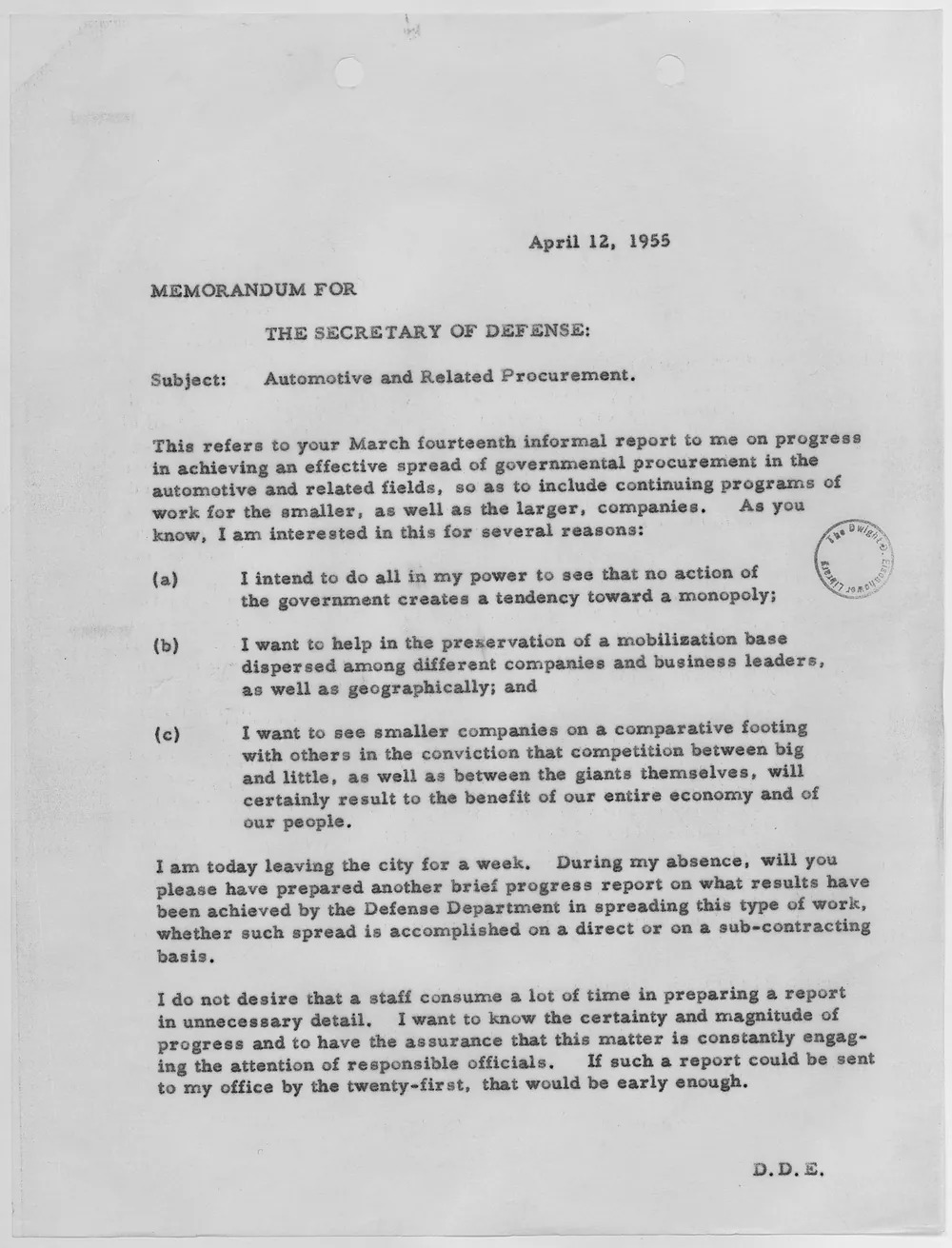
Output · markdown
MEMORANDUM FOR

THE SECRETARY OF DEFENSE:

Subject: Automotive and Related Procurement.

This refers to your March fourteenth informal report to me on progress in achieving an effective spread of governmental procurement in the automotive and related fields, so as to include continuing programs of work for the smaller, as well as the larger, companies. As you know, I am interested in this for several reasons:

(a) I intend to do all in my power to see that no action of the government creates a tendency toward a monopoly;

(b) I want to help in the preservation of a mobilization base dispersed among different companies and business leaders, as well as geographically; and

(c) I want to see smaller companies on a comparative footing with others in the conviction that competition between big and little, as well as between the giants themselves, will certainly result to the benefit of our entire economy and of our people.

I am today leaving the city for a week. During my absence, will you please have prepared another brief progress report on what results have been achieved by the Defense Department in spreading this type of work, whether such spread is accomplished on a direct or on a sub-contracting basis.

I do not desire that a staff consume a lot of time in preparing a report in unnecessary detail. I want to know the certainty and magnitude of progress and to have the assurance that this matter is constantly engaging the attention of responsible officials. If such a report could be sent to my office by the twenty-first, that would be early enough.
Typewritten memo, 1955 · unedited API output
Open full exampleInput · Image (JPG)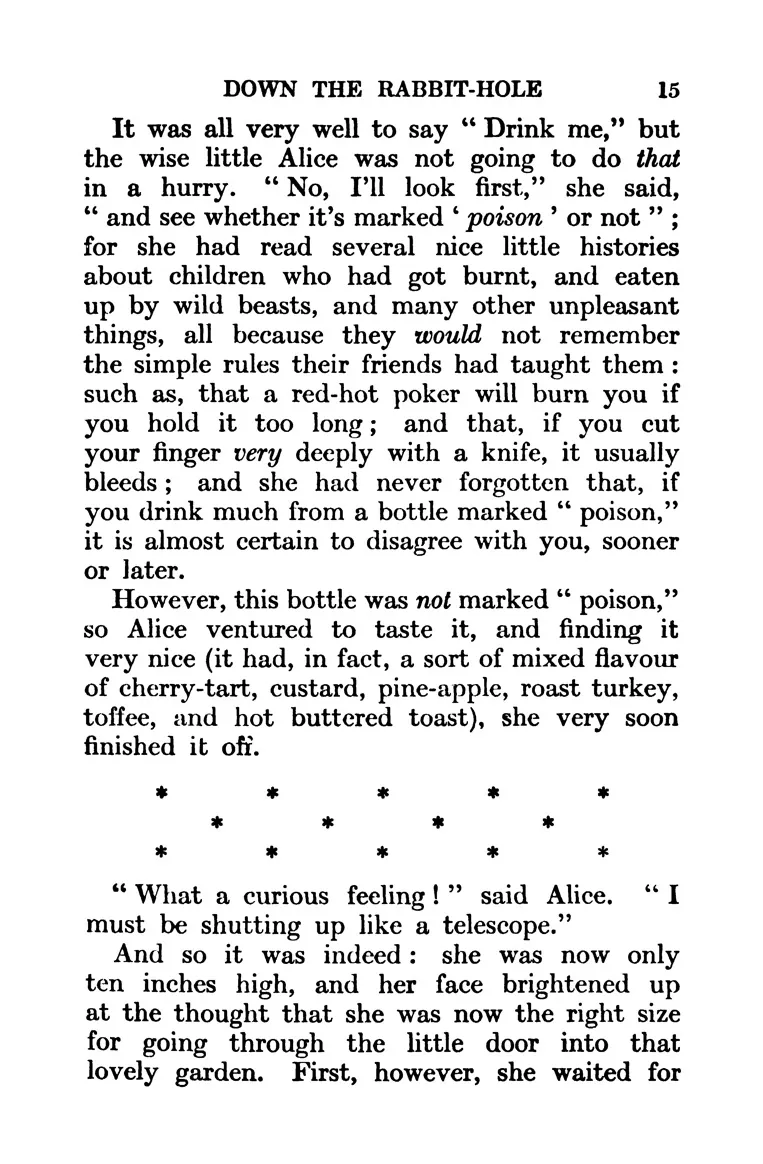
Output · markdown
It was all very well to say "Drink me," but the wise little Alice was not going to do that in a hurry. "No, I'll look first," she said, "and see whether it's marked 'poison' or not"; for she had read several nice little histories about children who had got burnt, and eaten up by wild beasts, and many other unpleasant things, all because they would not remember the simple rules their friends had taught them: such as, that a red-hot poker will burn you if you hold it too long; and that, if you cut your finger very deeply with a knife, it usually bleeds; and she had never forgotten that, if you drink much from a bottle marked "poison," it is almost certain to disagree with you, sooner or later.

However, this bottle was not marked "poison," so Alice ventured to taste it, and finding it very nice (it had, in fact, a sort of mixed flavour of cherry-tart, custard, pine-apple, roast turkey, toffee, and hot buttered toast), she very soon finished it off.

"What a curious feeling!", said Alice. "I must be shutting up like a telescope."

And so it was indeed: she was now only ten inches high, and her face brightened up at the thought that she was now the right size for going through the little door into that lovely garden. First, however, she waited for
Printed book page, Alice in Wonderland · unedited API output
Open full exampleInput · Text PDF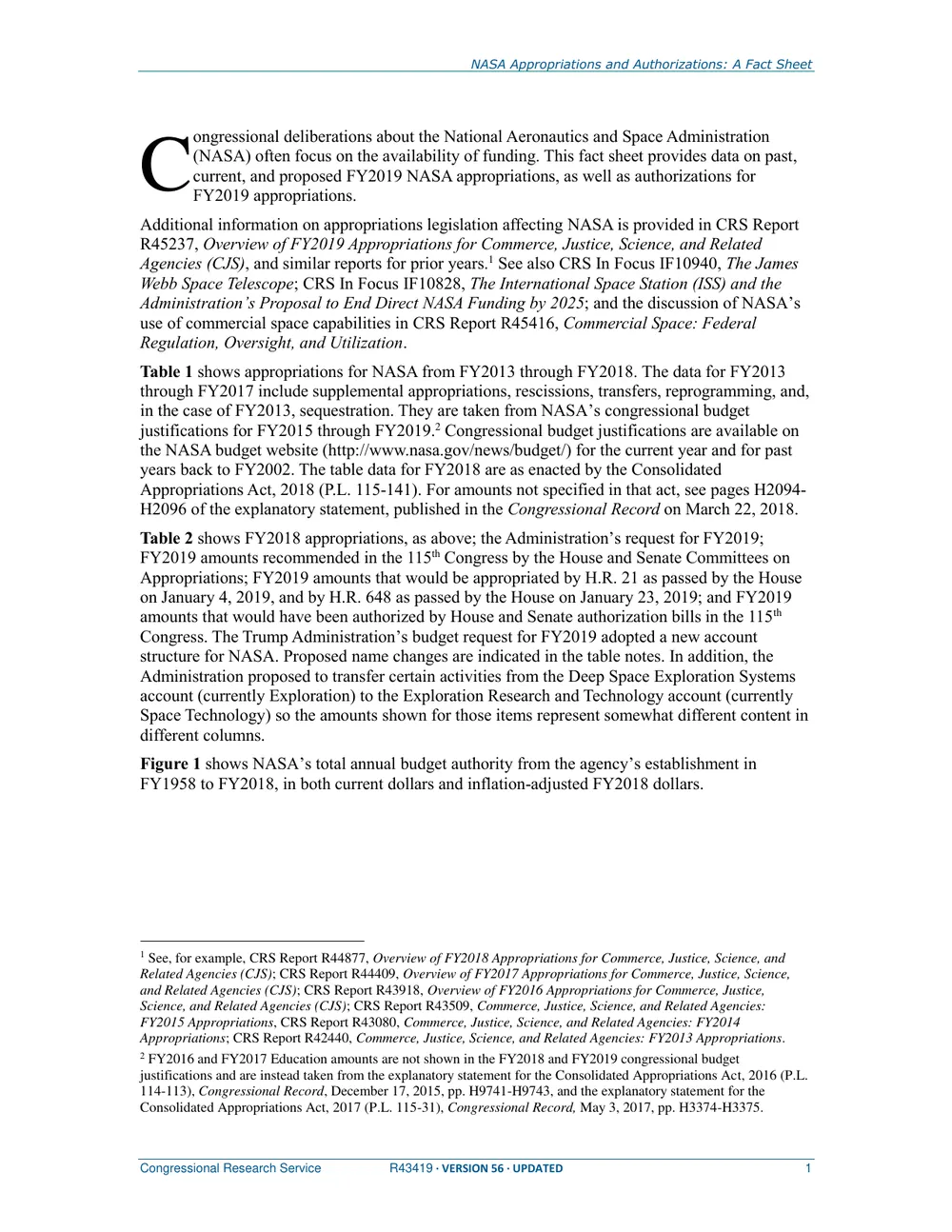
Output · markdown
NASA Appropriations and Authorizations: A Fact Sheet
C ongressional deliberations about the National Aeronautics and Space Administration
(NASA) often focus on the availability of funding. This fact sheet provides data on past,
current, and proposed FY2019 NASA appropriations, as well as authorizations for
FY2019 appropriations.
Additional information on appropriations legislation affecting NASA is provided in CRS Report
R45237, Overview of FY2019 Appropriations for Commerce, Justice, Science, and Related
Agencies (CJS), and similar reports for prior years.1 See also CRS In Focus IF10940, The James
Webb Space Telescope; CRS In Focus IF10828, The International Space Station (ISS) and the
Administration’s Proposal to End Direct NASA Funding by 2025; and the discussion of NASA’s
use of commercial space capabilities in CRS Report R45416, Commercial Space: Federal
Regulation, Oversight, and Utilization.
Table 1 shows appropriations for NASA from FY2013 through FY2018. The data for FY2013
through FY2017 include supplemental appropriations, rescissions, transfers, reprogramming, and,
in the case of FY2013, sequestration. They are taken from NASA’s congressional budget
justifications for FY2015 through FY2019.2 Congressional budget justifications are available on
the NASA budget website (http://www.nasa.gov/news/budget/) for the current year and for past
years back to FY2002. The table data for FY2018 are as enacted by the Consolidated
Appropriations Act, 2018 (P.L. 115-141). For amounts not specified in that act, see pages H2094-
H2096 of the explanatory statement, published in the Congressional Record on March 22, 2018.
Table 2 shows FY2018 appropriations, as above; the Administration’s request for FY2019;
FY2019 amounts recommended in the 115th Congress by the House and Senate Committees on
Appropriations; FY2019 amounts that would be appropriated by H.R. 21 as passed by the House
on January 4, 2019, and by H.R. 648 as passed by the House on January 23, 2019; and FY2019
amounts that would have been authorized by House and Senate authorization bills in the 115th
Congress. The Trump Administration’s budget request for FY2019 adopted a new account
structure for NASA. Proposed name changes are indicated in the table notes. In addition, the
Administration proposed to transfer certain activities from the Deep Space Exploration Systems
account (currently Exploration) to the Exploration Research and Technology account (currently
Space Technology) so the amounts shown for those items represent somewhat different content in
different columns.
Figure 1 shows NASA’s total annual budget authority from the agency’s establishment in
FY1958 to FY2018, in both current dollars and inflation-adjusted FY2018 dollars.
1 See, for example, CRS Report R44877, Overview of FY2018 Appropriations for Commerce, Justice, Science, and
Related Agencies (CJS); CRS Report R44409, Overview of FY2017 Appropriations for Commerce, Justice, Science,
and Related Agencies (CJS); CRS Report R43918, Overview of FY2016 Appropriations for Commerce, Justice,
Science, and Related Agencies (CJS); CRS Report R43509, Commerce, Justice, Science, and Related Agencies:
FY2015 Appropriations, CRS Report R43080, Commerce, Justice, Science, and Related Agencies: FY2014
Appropriations; CRS Report R42440, Commerce, Justice, Science, and Related Agencies: FY2013 Appropriations.
2 FY2016 and FY2017 Education amounts are not shown in the FY2018 and FY2019 congressional budget
justifications and are instead taken from the explanatory statement for the Consolidated Appropriations Act, 2016 (P.L.
114-113), Congressional Record, December 17, 2015, pp. H9741-H9743, and the explanatory statement for the
Consolidated Appropriations Act, 2017 (P.L. 115-31), Congressional Record, May 3, 2017, pp. H3374-H3375.
Congressional Research Service R43419 · VERSION 56 · UPDATED 1
Government report, two footnotes · unedited API output
Open full exampleAll examples — with the conversion audit for each.
See what it did
Every answer traces back to a page you can open.
The console is not a wrapper on the API — it is where a person checks the crawl, reads the chunks and finds the bad conversion.
 Jobs · Docs KB5 of 128
crawldocs.example.com24completed
uploadsecurity-notes.pdf61completed
monitorchangelog page—watching
crawlhelp.example.com9running
mapexample.com318completed
crawl tree · job_8b41d0
/             200  ·  12 links
├─ /auth      200  ·  security-notes.pdf
├─ /api       200  ·  4 links
└─ /v1/legacy 301  →  /v2
Every job, with the tree it produced
- Status, inputs and per-job worker logs
- Crawls render as a tree, so a dead branch is visible
- Cancel a queued or running job from the row
Page · /authentication18 chunksparsed markdown
# Authentication

Every request carries an x-api-key header.
Keys never expire on their own.
chunk 01Authentication180 tokens
chunk 02Rotating a key164 tokens
chunk 03Rate limits212 tokens
Read what your model will be given
- Markdown per page, chunks per page
- Headings and code fences respected
- Export a KB or a job as JSONL or CSV
Search · Docs KBsemantichow do I rotate a key without downtimehybrid
all jobsmarkdownenlast 30 days
/authentication — Rotating a key0.91
issue a second key, then revoke the first
/quickstart — First request0.74
pass your key in the x-api-key header
security-notes.pdf — p. 40.62
key rotation and storage
Both search modes, scoped to one KB
- Keyword and hybrid semantic, same API key
- Filter by job, type, language and date
- Scores come back with the chunk
Audit · security-notes.pdftext layer found91/100
48,210 → 46,802 words
613 chunks
Content fidelity0.94 ROUGE-1
Structure preserved88%
ML-readiness90%
Length fidelity0.97 ratio
A score for the conversion, not a shrug
- ROUGE-1, Jaccard, vocabulary coverage, length fidelity
- Scanned PDFs judged on their OCR output
- Compare shows source and markdown side by side
API keys · usage30 daysproductionsk_live_••••4f21active
stagingsk_test_••••9c07idle
agent-mcpsk_live_••••1b83active
jobs per day
Keys, usage and roles you can audit
- Per-key usage charts and daily job counts
- Admin and user roles — enforced at the API
- Orgs with per-org usage for the whole estate
For developers
Six surfaces, one API key.
REST, Node, Python, a terminal client, 21 MCP tools and an n8n node, all on the same API key.
shell
# crawl a site, then ask it something
curl -X POST $KB/api/jobs/crawl -H "x-api-key: $KEY" \
  -d '{"kb_id":"kb_3f9c21","url":"https://docs.example.com","limit":25}'

curl "$KB/api/kb/kb_3f9c21/search/embed?q=rotate%20api%20key" \
  -H "x-api-key: $KEY"
sarvcrawl
import { SarvKB } from 'sarvcrawl'

const kb = new SarvKB({ apiKey: process.env.SARV_KB_KEY })

const job = await kb.crawl({ kbId: 'kb_3f9c21', url: 'https://docs.example.com', limit: 25 })
await kb.waitFor(job.jobId)

const hits = await kb.semanticSearch('kb_3f9c21', 'rotate api key')
sarvcrawl
from sarvcrawl import SarvKB

kb = SarvKB(api_key=os.environ["SARV_KB_KEY"])

job = kb.crawl(kb_id="kb_3f9c21", url="https://docs.example.com", limit=25)
kb.wait_for(job.job_id)

hits = kb.semantic_search("kb_3f9c21", "rotate api key")
sarv-kb
$ sarv-kb kb create "Docs"
$ sarv-kb crawl https://docs.example.com --kb kb_3f9c21 --limit 50 --wait
$ sarv-kb find "rotate api key" --kb kb_3f9c21
$ sarv-kb export --kb kb_3f9c21 --format jsonl -o kb.jsonl
sarvcrawl-mcp · 21 tools
{
  "mcpServers": {
    "sarv-kb": {
      "command": "npx",
      "args": ["sarvcrawl-mcp"],
      "env": { "KB_BASE_URL": "https://crawl.sarv.com", "KB_API_KEY": "sk_live_..." }
    }
  }
}

# then: "crawl docs.example.com into my Docs KB and tell me how to rotate a key"
n8n-nodes-sarvcrawl
SarvCrawl  →  Resource: Job     ·  Operation: Crawl Website
           →  URL: {{ $json.domain }}  ·  Max Depth: 2  ·  Page Limit: 25

SarvCrawl  →  Resource: Search  ·  Operation: Semantic Search
           →  Query: {{ $json.question }}

AI Agent → answers from the hits the Search step returnedAsked before every integration
8 things people check first.
What is a web crawling API, and how is SarvCrawl different?
A web crawling API fetches web content programmatically. SarvCrawl also parses what it fetches to markdown, then chunks, embeds and indexes it, so the site you crawled becomes a knowledge base you can search by keyword or by meaning on a paid plan.
Does it handle JavaScript-rendered pages?
Yes. Pages are rendered in a headless browser before they are converted, so client-side apps come back as markdown rather than an empty shell. PDFs and office files are parsed too, and scans with no text layer go through OCR.
Scrape, crawl or map — which one?
Scrape takes one URL. Crawl follows links from a root URL, bounded by depth, a page limit and a path exclude list, and returns a tree of what it found. Map only discovers URLs — no content, no page cost — which is the cheap way to decide what is worth crawling.
What happens to a PDF, and to a scanned one?
It is parsed to markdown, stored beside the original, then indexed, chunked and embedded like any page. With no text layer — a scan or a photo — it goes through OCR instead, and the conversion audit scores the OCR output on its own rather than against a text layer that does not exist.
Do you train models on our content?
No. There is no training or fine-tuning step anywhere in the pipeline. It is retrieval: crawl, parse, chunk, embed, search. The chunks stay in your knowledge base, are readable in the console, and export to JSONL or CSV whenever you want them out.
Can an AI client drive it directly?
Yes — 21 zod-validated MCP tools over stdio or HTTP streamable at /v2/mcp. The tool descriptions tell the model to poll job status until a job completes before it searches, so an agent runs the async pipeline without glue code.
How many tokens do I get for free?
One billion on sign-up, with no card. Tokens are what parsing, chunking and embedding consume, so at roughly 500 tokens to a page of text that is on the order of two million pages through the full pipeline before you owe anything. Searching what you ingested needs a paid plan.
Can we run it ourselves?
On Enterprise, yes. The stack ships as a Compose file for a single host and a Swarm bundle for a cluster, behind one nginx front door, with five dependencies checked at boot: PostgreSQL, Redis, RabbitMQ, MinIO and Elasticsearch.
More in the API docs.
Websites are noisy.Your agent deserves the signal.
- 1 billion tokens free
- No card to start
- Exports anytime